> For the complete documentation index, see [llms.txt](https://docs.aeroai.io/llms.txt). Markdown versions of documentation pages are available by appending `.md` to page URLs; this page is available as [Markdown](https://docs.aeroai.io/siega-desktop-features/actions/point-cloud.md).
# Point Cloud
Edit the colors of styled Cesium 3D Tileset LiDAR Point Clouds
### Editing Colors of Cesium 3D Tileset LiDAR Point Clouds
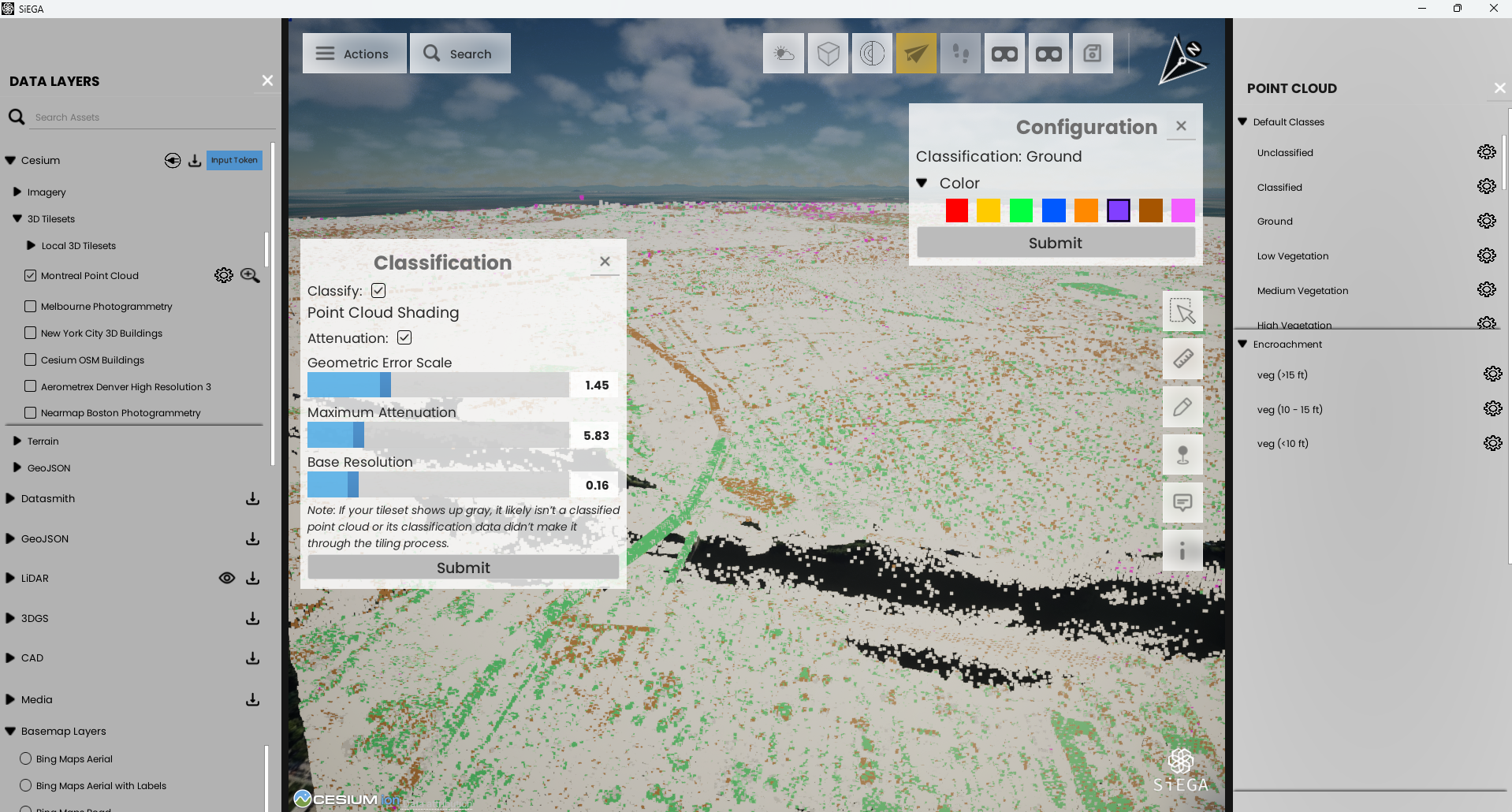
This feature enables users to change the colors of classifications in Cesium 3D Tileset LiDAR Point Clouds. Altering a classification's color affects how points appear for all such Point Clouds globally.
**Prerequisite:** Ensure you have a classified point cloud in the world to see visible changes; however, the point cloud menu can still be used regardless.
#### How to Access the Point Cloud Menu:
1. Go to the Actions menu.
2. Click on **Point Cloud**.
#### How to Change a Classification's Color:
1. Select the class you wish to modify.
2. Click on the settings icon.
3. Expand the color dropdown.
4. Choose your desired color.
5. Click the Submit button to apply your changes